Schedule What Happens Later.
Reminders, follow-ups, notifications, and expirations. Every delivery scheduled, monitored, and recoverable.

Built for Production
What You'll Build
Common patterns for reminders, drips, and expirations. Each with a guide, code examples, and a DIY comparison.
Reminders and Follow-Ups
- • Trial reminders before expiry
- • Abandoned cart nudges
- • Interview scheduling
Onboarding and Engagement Drips
- • Welcome sequences after signup
- • Coach or mentor reminders
- • Re-engagement nudges
Expiration and Timeout Checks
- • Invitation expiry after 7 days
- • Reservation hold releases
- • Trial window enforcement
Also used for status polling, delayed system checks, and scheduled content publishing.
How It Works
Schedule a Webhook
Install the SDK and schedule a webhook with your target path, delivery time, and custom payload.
// Schedule a reminder for 24 hours from now
const hook = await posthook.hooks.schedule({
  path: '/api/send-reminder',
  postIn: '24h',
  data: { reminderId: 'rem_abc123' }
});Handle the Callback
When the time arrives, we POST to your endpoint with a signed payload. Verify and handle it.
// Your endpoint receives a signed payload
export async function POST(req: Request) {
  const delivery = signatures.parseDelivery(
    await req.text(),
    req.headers,
  );
  await sendReminder(delivery.data.reminderId);
  return new Response('OK', { status: 200 });
}
Need more time? Return a 202 and call back with ack/nack when processing completes, up to 3 hours.
Test locally first. Use our CLI to receive webhooks on your machine during development.
Why not build it yourself?
For most teams, the realistic alternative isn't building a scheduling system — it's adding a timestamp column and a cron poller to an existing domain table. For AWS teams, it's EventBridge. Here's how each looks in practice.
Per-event timing
Observability
Failure alerting
Recovery
Sprawl at 5+ concerns
At 5 timing concerns: five pollers, five places where silence means a customer complaint. At 10: your on-call rotation owns it.
What's Included
Scheduling, delivery, and monitoring. Everything you need to stop thinking about whether things happened when expected.
Per-Endpoint Anomaly Alerts
Baselines learned from each endpoint's own traffic. Alerts when deviation exceeds your configured sensitivity. Routed to email, Slack, or webhook.
Learn MorePer-Hook Activity
Scheduling, attempts, responses, cancellations — every hook captured and queryable for up to 90 days. Inspect any hook and see aggregate health by endpoint.
Create a free accountBulk Retry & Replay
Recover from your own bad deploys. Resend by endpoint and time range — completed deliveries too, not just failures.
Create a free accountTimezone-Aware Scheduling
Fire at 9 a.m. in the user's local time without writing timezone math. DST-safe across spring-forward and fall-back.
Learn MoreAsync Hooks
Return a 202 and call back with ack/nack when processing completes, up to 3 hours. Long-running jobs without workarounds.
Learn MoreFlexible Retries
Retries don't count toward your quota. Fixed or exponential backoff with jitter, overridable per hook.
Learn MoreOfficial SDKs
TypeScript, Python, and Go. Handles auth, pagination, retries, and signature verification.
QuickstartLocal Development
Receive webhooks on localhost with the CLI. The same WebSocket delivery works in production for endpoints behind VPCs, firewalls, or private networks.
Learn MoreConfig-as-Code
Manage recurring schedules in version-controlled TOML. Diff, validate, and deploy from your terminal.
Learn MoreMulti-Project Workspaces
Separate keys, signing secrets, alerting, and retention per project. Use them as environments, apps, or regions.
Learn MoreArchitected for Reliability
Multi-zone deployment with durable message queues, synchronous replication, and automatic failover. 99.98% uptime since 2018.
Secure by Default
HTTPS-only delivery with HMAC-SHA256 signatures. Built-in replay protection and key rotation.
Learn MoreSee Every Hook
Filter by status, endpoint, or time range. Expand any hook to inspect payloads, attempts, and response bodies. Queryable for up to 90 days.
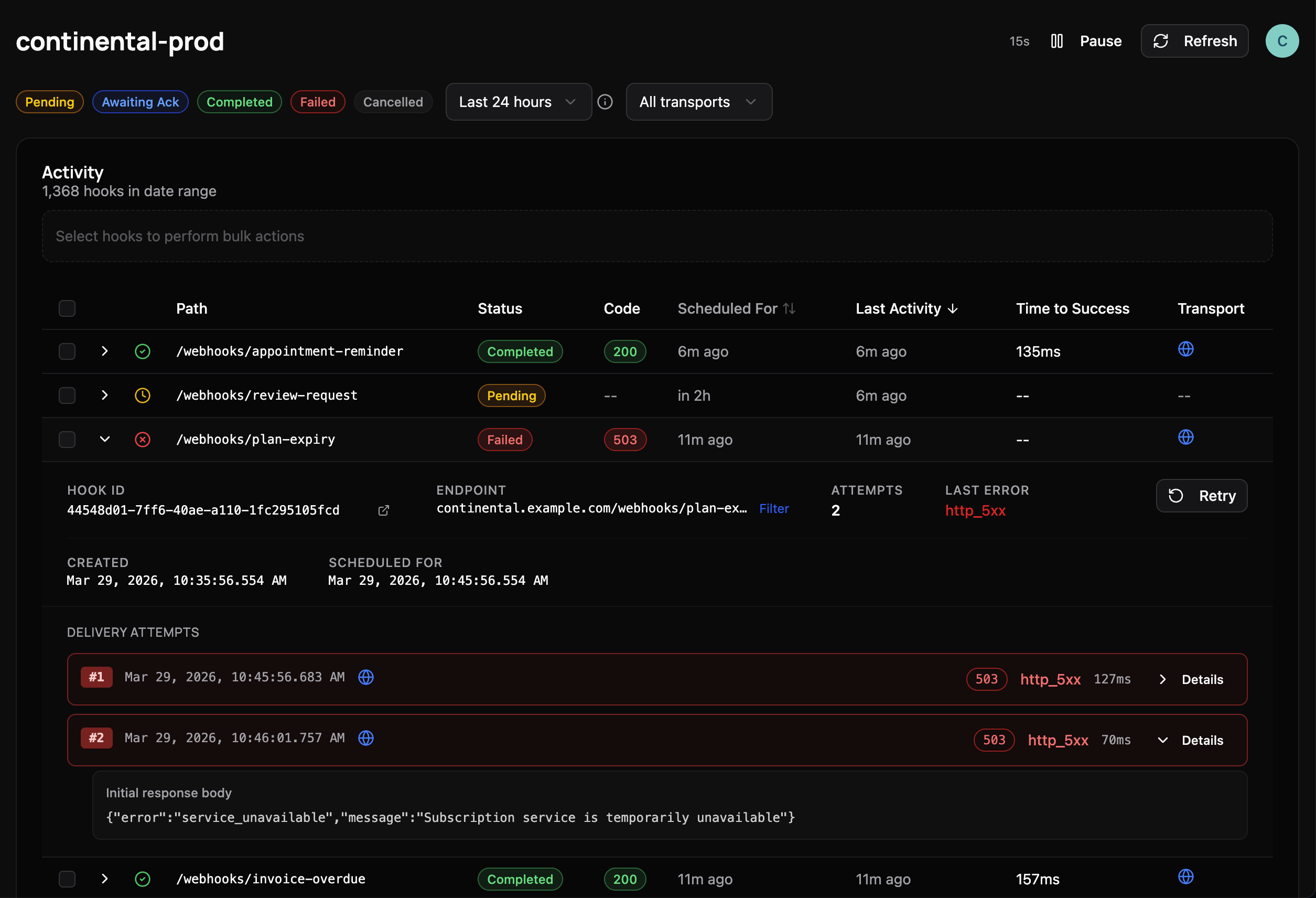
Deploy on Tuesday had a bug? Filter to the affected endpoint, bulk-replay completed deliveries after the fix.
Also Supports Recurring Schedules
Keep all your scheduling in one place. Define daily, weekly, or monthly schedules in version-controlled config. No separate cron infrastructure to maintain.
Hourly, daily, weekly, and monthly frequencies
Automatic DST handling for spring-forward and fall-back
Chained recurring steps with ordering
# Sync CRM data every Mon/Wed/Fri at 9 AM ET
[[sequences]]
name = "crm-sync"

[sequences.schedule]
frequency = "weekly"
timezone  = "America/New_York"
time     = { hour = 9, minute = 0 }
onDays   = ["monday", "wednesday", "friday"]

[sequences.steps.sync]
path = "/webhooks/crm/sync"

[sequences.steps.notify]
path       = "/webhooks/crm/notify"
depends_on = ["sync"]
Check into git. Diff, validate, and deploy with npx posthook apply.
Simple, Predictable Pricing
Choose the plan that matches your production workflows and volume. Only scheduling counts — retries, deliveries, and API calls are always included.
Launch
20,000 hooks/month
- 5 projects
- 30-day log retention
- 5-min alerts
- Email & Slack alerts
Growth
100,000 hooks/month
- 15 projects
- 60-day log retention
- 2-min alerts
- Email & Slack alerts
- Bulk actions
Scale
500,000 hooks/month
- 50 projects
- 90-day log retention
- 30-sec alerts
- Email, Slack & Webhook alerts
- Bulk actions
- Priority support
Don't Build Your Own Scheduling System.
Start free and schedule your first webhook in minutes. No credit card required.
1,000 free hooks per month included